Harvest alternative for freelancers: One Lancer vs Harvest
Harvest is a time tracker with invoicing, free for one person and two projects, then $11 a seat a month. One Lancer is $14.99 a month for one person, with projects, reminders and client follow-ups in the same price.
If you track your hours in Harvest, or are looking for a Harvest alternative, this is how One Lancer compares. We make One Lancer, so read this with that in mind. Everything about Harvest below comes from Harvest's own pricing and feature pages, and we say plainly where it is the better choice.
Quick answer
Harvest is the better choice for a small team that logs time together: it is free for one person and two projects, then $11 a seat a month. One Lancer costs $14.99 a month and is the better Harvest alternative for one freelancer who also wants projects, payment reminders, client follow-ups and an income forecast in the same price.
Pick One Lancer if
- You work alone and want your projects, tasks, hours and invoices in one place
- You lose money on invoices nobody chases, not on time you forgot to track
- You bill clients in different currencies
- You want to know what the next few months will bring in
Pick Harvest if
- You only need a timer and have at most two projects, so the free plan covers you
- You want the timer inside Asana, Trello, Jira or Slack
- Your invoices have to sync with QuickBooks Online or Xero
- You run a team and need timesheet approvals and capacity reports
Price and what the price limits
| One Lancer | Harvest | |
|---|---|---|
| Price | $14.99 a month, or $149 a year | Free plan; Teams $11 a seat a month, or $9 billed yearly |
| Free plan | ✕ | ✓ 1 seat, 2 projects |
| Projects and clients | Unlimited | 2 projects on Free; extra invoices, projects, clients and tasks billed by usage |
| Card payments and accounting sync | Your own Stripe account, on the one plan | From Teams |
| Lifetime | $299 once, limited number of accounts | Not offered |
| Free trial | 7 days, card at sign-up | 30 days, no card |
Harvest prices and limits read from getharvest.com/pricing on 13 November 2026. Enterprise is $17.50 a seat a month, or $14 billed yearly. Harvest does not list on that page how much usage each plan includes. Check it before you decide, pricing moves.
On price per seat, Harvest is cheaper, and its free plan costs nothing at all. The free plan stops at two projects, which most freelancers pass in their first month. On Teams, Harvest's own pricing page says extra invoices, projects, clients and tasks are billed based on usage, so the final bill depends on how much you invoice. One Lancer is one flat price with unlimited clients, projects and invoices.
Where Harvest is the better tool
Harvest is a mature time tracker. (If you want tracking for free, see how Clockify compares.) If any of these matters to you, Harvest is the better fit.
- A free plan. One person, two projects, time tracking, invoices and expenses, at no cost. One Lancer has a 7-day trial and then costs $14.99 a month.
- The timer is everywhere. Desktop apps for Mac and Windows, iOS and Android apps, Chrome and Edge, and a timer inside Asana, Trello, Jira, Basecamp, ClickUp and Slack. One Lancer's timer is in the app, which installs on a phone from the browser.
- Expenses. Log expenses, photograph receipts on your phone and put both on the invoice. One Lancer does not track expenses.
- Accounting sync. Invoices and payments copy to QuickBooks Online or Xero by themselves. One Lancer has no accounting integration.
- Budgets and profitability. Project budgets that update as time comes in, with an alert when a project is at risk, and profitability reports on Enterprise.
- A team. Team reports, capacity, reminders to fill in timesheets, approvals before you invoice, and 70+ integrations. One Lancer is single-player on purpose.
Where One Lancer is the better tool
One Lancer was built from 100+ interviews with freelancers. Most of them already tracked their time. What they lost money on came after: invoices sent late, or never chased.
- Projects and tasks. Tasks with subtasks, priorities and estimated hours, in list, board, calendar or Gantt view. Harvest tracks time against projects and tasks, but does not advertise task boards.
- Hours land on a draft by themselves. Every billable hour with a rate goes onto a draft invoice for that project as you track it, so there is nothing to generate at the end of the month.
- Reminders you set up once. One switch for the whole account, a day before the due date, on it, then every 7 days up to 3 times. Your own wording with the invoice attached, sent from your own Gmail if you like, never during your quiet hours.
- Clients you keep in touch with. A follow-up rule per client, a list of what needs you today, and a private label for clients who pay late.
- An income forecast. What the next 6, 12 or 24 months look like, from unpaid invoices, repeating payments and open projects. Harvest Forecast is something else: a separate product for scheduling a team.
- It looks after you too. Quiet hours, an away mode, a nudge when you pass your weekly hours cap, and Slow Month, one month a year without paying, after your first three.
Feature by feature
Time tracking
Harvest's timer starts in one click and keeps running in the background, on the web, the desktop apps, the phone apps or inside the tools you already use. You can also fill in a timesheet by day or by week, and Harvest can remind you to track your time. Your personal reports split billable from non-billable hours.
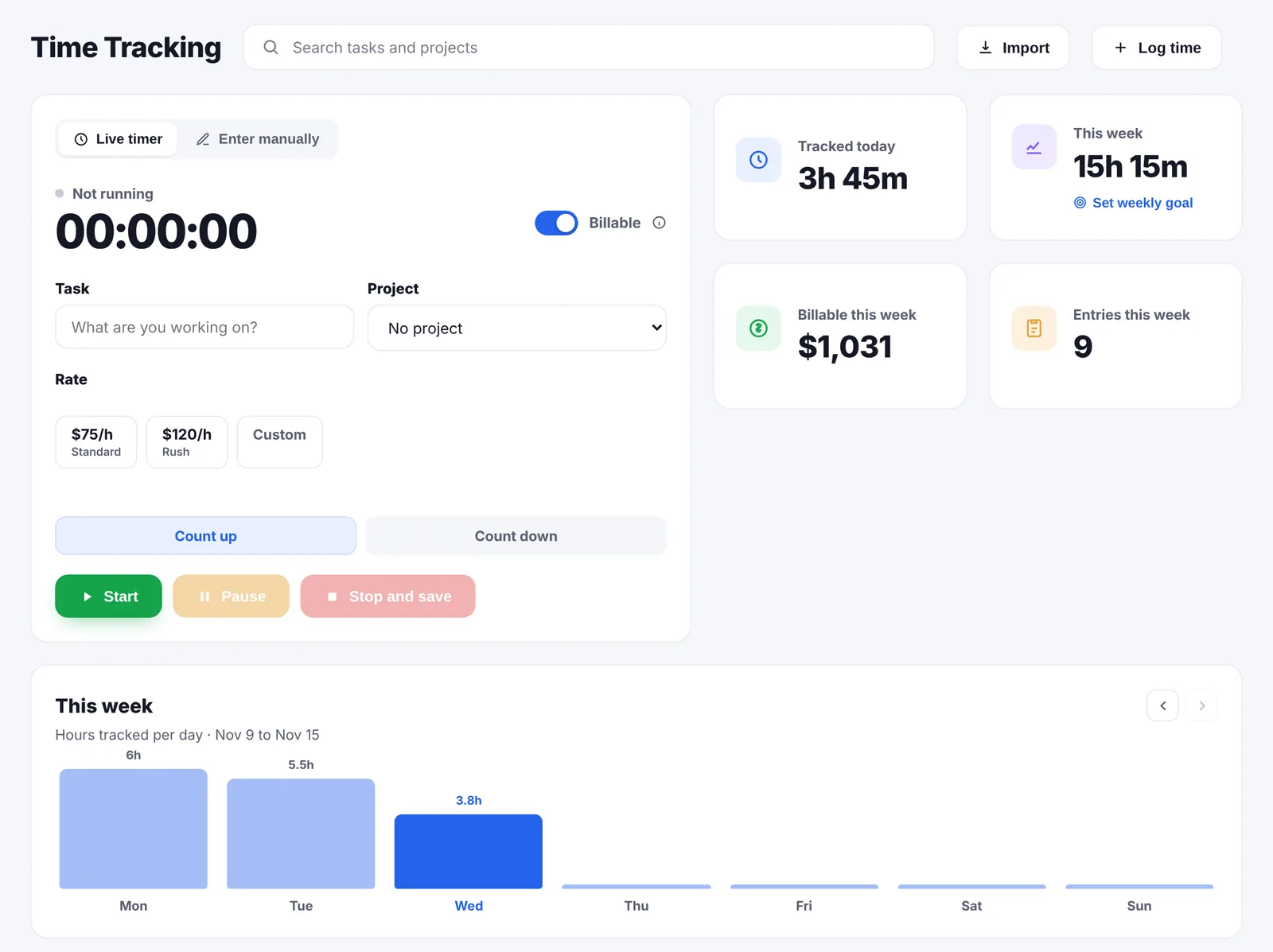
In One Lancer you start the timer from the task itself, counting up or down, or log time afterwards as a start and end time or just the number of hours. Each entry gets one of your saved rates, say Standard and Rush, and a switch for billable or not, and the week is a chart of hours per day. When a client wants to see the hours, you export a time summary with your own title and a note, grouped by project.
Invoicing and payments
Harvest turns tracked hours and expenses into an invoice, with receipt photos attached if you like, and emails it to the client. Clients pay by card or ACH through Stripe, or through PayPal. It has recurring invoices for repeat clients, late payment reminders on a timeframe you set, and a dashboard of what is paid, unpaid or pending.
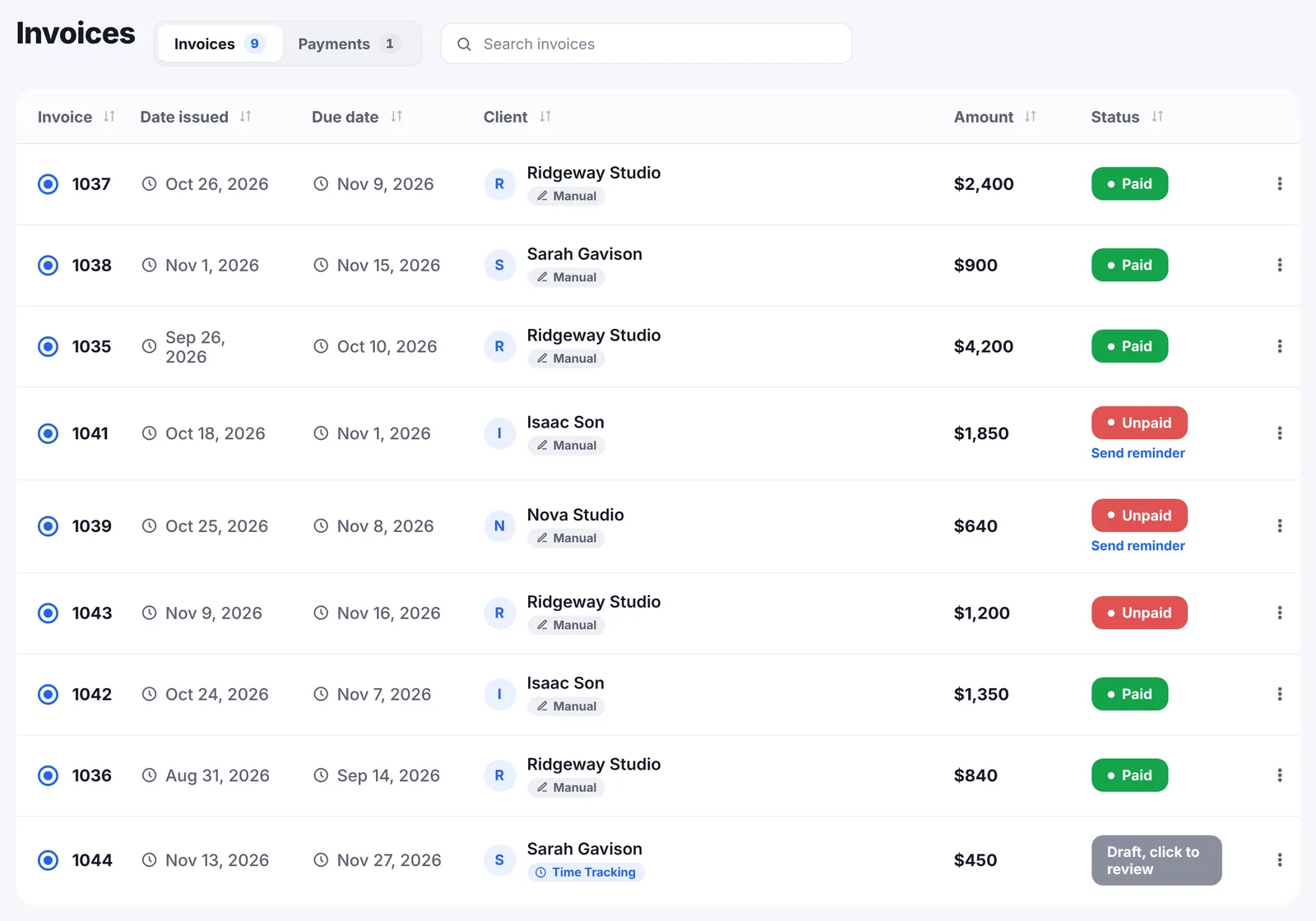
One Lancer sends the invoice as a PDF from your name, or from your own Gmail if you connect it, with your own payment details and an optional card link through your own Stripe account, where One Lancer adds nothing on top. It has five invoice designs, recurring invoices from weekly to yearly, a tax percentage, 43 currencies set per client and its own numbering.
Projects and tasks
In Harvest a project holds the tasks you track time against, with a budget and its costs. Its feature pages do not describe task boards, subtasks or due dates, and Harvest's own integrations point you to Asana, Trello or Jira for that.
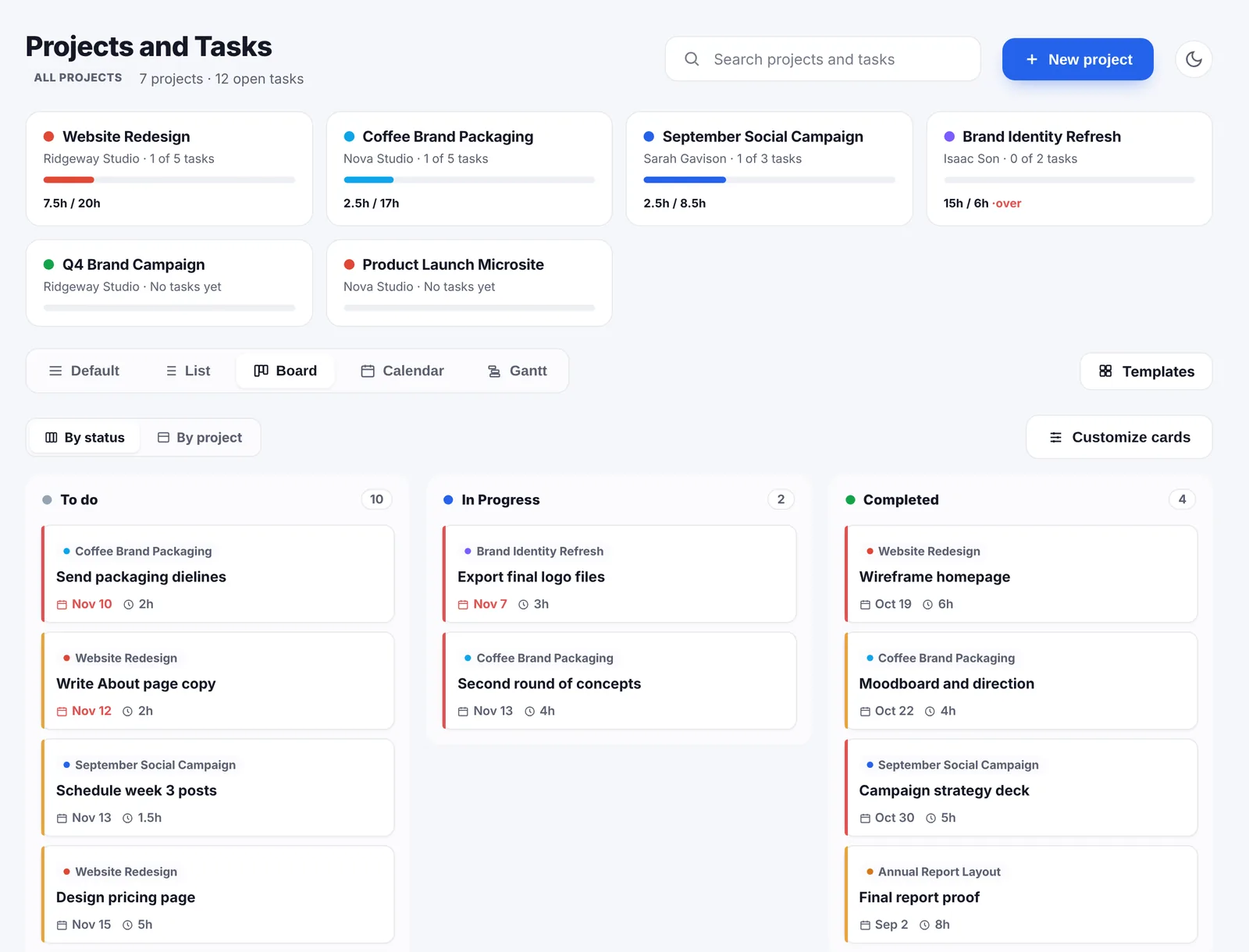
One Lancer has the project work itself. Each project has a client, a project value and a default hourly rate, and its tasks show as a list, a board, a calendar or a Gantt timeline. A task can have subtasks, a priority and estimated hours, and a project template brings its tasks, rate and invoice setup with it. It has no recurring tasks or task dependencies.
Reports and forecast
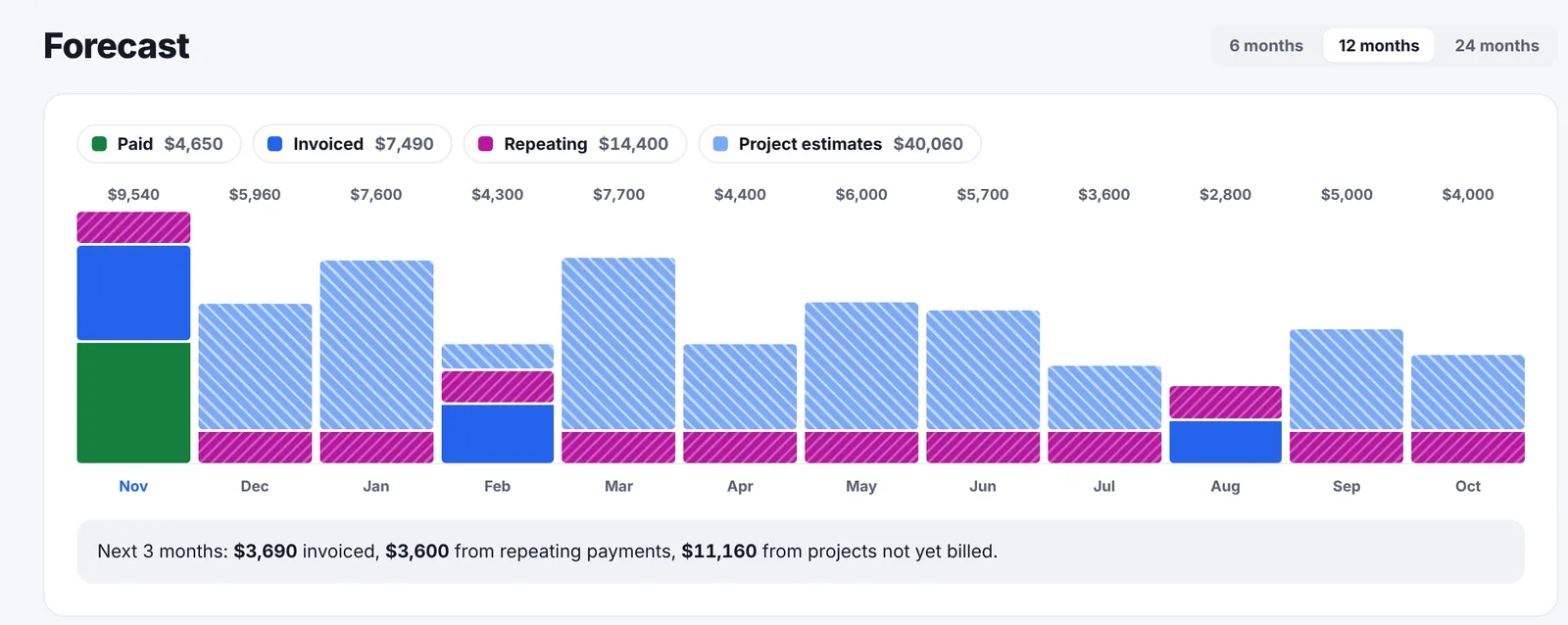
Harvest reports on where the time goes by project and task, on budgets as they are used, and, on Enterprise, on profitability by project and client. Custom reports can run and email themselves on a schedule. One Lancer's dashboard opens on today's priorities, with tiles you choose, and the Invoicing page forecasts your income for the next 6, 12 or 24 months, month by month.
A month with both
Say you are a freelance developer with five clients, billed by the hour, two of them in euros. You track about 80 hours a month.
In Harvest, five clients means more than the free plan's two projects, so you are on Teams at $11 a month. The timer runs from Jira or the Mac app, which is quick. At the end of the month you turn the hours into invoices and send them, with reminders for the late ones. Your tasks live in another tool, and so does any record of when you last spoke to each client.
In One Lancer, it is $14.99 a month. The tasks are in the same app as the timer, so you start it from the task. By the end of the month each project already has a draft invoice with the hours on it, the euro clients get invoices in euros, and reminders are already on. The dashboard shows what came in and what the next months look like.
If you live inside Jira or Asana and only need a timer that feeds invoices, Harvest is a good tool. If you want one place for the work and the money, One Lancer is the better fit.
The two side by side
| One Lancer | Harvest | |
|---|---|---|
| Price and plans | ||
| Built for | One freelancer | Teams that bill for time |
| Smallest paid bill | $14.99 a month | $11 a month (1 seat), or a free plan for 2 projects |
| Time and the work | ||
| Time tracking | ✓ timer on the task, saved rates, time summary | ✓ timer, timesheets, desktop and phone apps |
| Timer inside other tools | ✕ | ✓ Asana, Trello, Jira, Basecamp, ClickUp, Slack |
| Invoice from tracked hours | ✓ draft builds itself | ✓ from time and expenses |
| Automatic payment reminders | ✓ before and after the due date, quiet hours respected | ✓ late payment reminders |
| Projects with task boards | ✓ list, board, calendar, Gantt | Not advertised |
| Clients and documents | ||
| Client follow-up rhythm | ✓ | Not advertised |
| Planning, wellbeing and limits | ||
| Income forecast | ✓ 6, 12 or 24 months | ✕ (Forecast is team scheduling) |
| "What do I do first" screen | ✓ | Not advertised |
| Wellbeing settings | ✓ quiet hours, away mode, overwork nudge | Not advertised |
| Expenses and receipts | ✕ | ✓ |
| Project budgets | Project value, no budget alerts | ✓ with alerts |
| Card payments | Your own Stripe account | Stripe (card, ACH) and PayPal, from Teams |
| Accounting sync | ✕ | ✓ QuickBooks Online, Xero |
| Mobile | Installs from the browser | ✓ iOS and Android apps |
| Team members | ✕ | ✓ unlimited seats on Teams |
| Lifetime plan | $299 once | Not offered |
So which one
If you have two projects or fewer and only need to track time, Harvest's free plan is enough. If you run a team that tracks time inside Jira or Asana and syncs invoices to Xero, Harvest does that and One Lancer does not.
If you work alone, Harvest covers the hours and the invoice, and the rest sits in other tools: tasks in one, reminders of who to follow up in another, next month's income in a spreadsheet. One Lancer puts those in a single app for one person.
Before you decide, look at your last three months. If the hours were tracked but invoices went out late or were never chased, the gap is after the timer, and One Lancer covers that part.
Switching from Harvest
- Bring your hours. One Lancer has an import for Harvest time entries, so your history comes with you.
- Bring your clients. Import them from a CSV or Excel file, a Google Sheet, HubSpot or Notion. Columns One Lancer does not know become custom fields, so nothing is dropped.
- Bring your invoices. Upload the invoices you still need as PDFs, so they sit in the same list.
- Turn reminders on. One switch in One Lancer covers every new invoice. Invoices that are still open in Harvest keep being chased there until they are paid.
Expenses and receipts have no place in One Lancer, so keep them in Harvest, your accounting software or a receipts app.
Other Harvest alternatives
One Lancer is one Harvest alternative; it fits a freelancer who wants the hours, invoices and reminders in one place. These are the other tools we have compared side by side, each from the vendor's own pages:
- FreshBooks. FreshBooks is accounting software that also invoices, with expenses, bank reconciliation and proposals.
- Zoho. Zoho is a suite: Zoho Invoice is free for 3 projects and 500 invoices a year, next to Zoho CRM, Bookings and Solo.
- Bonsai. Bonsai grows into an agency suite with proposals, contracts, bookkeeping and team seats; invoices start on its $25 plan.
- Indy. Indy is free for 3 invoices a month and keeps Gmail, white labelling and payment reminders for its Pro plan.
- Plutio. Plutio is the wider product: proposals, scheduling, forms, a client portal and a team, with a 9-client limit on its cheapest plan.
- Basecamp. Basecamp runs projects and client conversations for teams, from $29 a month, with no invoicing and time tracking only from $99.
- Clockify. Clockify tracks time free for up to 5 users, with desktop and mobile apps; invoicing starts on its Standard plan at $5.49 a seat.
- Toggl Track. The best-known time tracker: free for up to 5 users, with billable rates on its $10 Starter plan and no invoicing of its own.
- Moxie. All-in-one for freelancers from $12 a month, with proposals and contracts on the cheapest plan and the client portal on Pro.
All of them are on the comparisons page.
Questions people ask
Can a freelancer use Harvest on their own?
Yes. Harvest has a free plan for one person and two projects, and its Teams plan is $11 a seat a month, or $9 billed yearly. Harvest says extra invoices, projects, clients and tasks are billed based on usage. One Lancer is $14.99 a month for one person with every feature.
Is One Lancer cheaper than Harvest?
Not per seat. Harvest Teams is $11 a month for one seat, or $9 billed yearly, and its free plan costs nothing for two projects. One Lancer is $14.99 a month or $149 a year. The difference is what is included: One Lancer has projects with tasks and boards, client follow-ups and an income forecast in the same price.
Who is Harvest built for?
Teams that track time and bill for it: agencies, consultancies and studios. Its paid plans add team reporting, capacity, timesheet approvals and profitability reports.
Does Harvest send automatic payment reminders?
Yes, Harvest can send late payment reminders on a timeframe you set. One Lancer has one switch for the whole account, writes before the due date as well as after, uses your own wording with the invoice PDF attached, and sends nothing during your quiet hours.
What does Harvest do that One Lancer does not?
A free plan, a timer inside Asana, Trello, Jira, Basecamp, ClickUp and Slack, desktop apps for Mac and Windows, iOS and Android apps, expenses with receipt photos, project budgets with alerts, sync with QuickBooks Online and Xero, PayPal payments, team reports and timesheet approvals.
What does One Lancer do that Harvest does not?
Projects with tasks, subtasks and list, board, calendar and Gantt views, a follow-up rhythm per client, a screen that opens on what to deal with first, an income forecast up to 24 months ahead, quiet hours and away mode, a lifetime plan and Slow Month.
Does Harvest forecast my income?
No. Harvest Forecast is a separate product for scheduling a team across projects, not a forecast of money coming in. One Lancer forecasts your income for the next 6, 12 or 24 months from unpaid invoices, repeating payments and open projects.
Can I move my time entries from Harvest to One Lancer?
Yes. One Lancer has an import for Harvest time entries, as well as for Toggl, Clockify, an Excel or CSV file, or a Google Sheet. Clients come in from a CSV or Excel file, and invoices you still need can be uploaded as PDFs.
Does One Lancer connect to Xero or QuickBooks the way Harvest does?
No. One Lancer tracks invoices and payments and exports everything, but it has no accounting integration. If your invoices must sync to QuickBooks Online or Xero, Harvest does that on its paid plans.
Do One Lancer and Harvest both have a free trial?
Harvest offers 30 days with no card, and a free plan after that. One Lancer offers 7 days, asks for a card at sign-up and charges after the trial unless you cancel.
Sources
Everything about Harvest on this page was read from Harvest's own pages on 13 November 2026:
- Harvest pricing: plans, seat prices, the free plan, usage billing and the trial
- Features and time tracking: timer, timesheets, apps, reminders and approvals
- Invoicing and payments: invoices from time and expenses, Stripe, PayPal, reminders and accounting sync
- Reports and analysis: budgets, profitability, capacity and custom reports
- Harvest Forecast: a separate product for team scheduling
- Integrations: Asana, Trello, Jira, Basecamp, Slack, QuickBooks Online, Xero and 70+ more
Prices move, and the figures above are what Harvest’s own pages said on the date given, so check theirs before you pay for anything. We wrote this page, Harvest did not: there is no partnership between us, nobody asked us to write it, and the name Harvest belongs to them.
Keep going
One Lancer vs FreshBooks One Lancer vs Bonsai One Lancer vs Trello One Lancer vs Plutio One Lancer vs HoneyBook One Lancer vs Scoro One Lancer vs Basecamp One Lancer vs Indy One Lancer vs Zoho What One Lancer does Pricing Billable hours calculator Freelance rate calculatorSee it before you decide
Seven days, your own clients and invoices in it, and a founder who answers email. Then $14.99 a month, cancel any time.