Clockify alternative for freelancers: One Lancer vs Clockify
Clockify is a time tracker for teams: free for up to 5 users, with invoicing from $5.49 a seat a month. One Lancer is $14.99 a month for one freelancer: it tracks the hours, sends the invoice and reminds the client until it is paid.
If you use Clockify, or are looking for a Clockify alternative, this is how One Lancer compares. We make One Lancer, so read this with that in mind. Everything about Clockify below comes from its own pricing and feature pages, and we say plainly where it is the better choice, including on price.
Quick answer
Clockify is the cheaper choice if you only track time: it is free for up to 5 users, and one seat with invoicing costs $5.49 a month billed yearly. One Lancer costs $14.99 a month and is the better Clockify alternative for a freelancer who bills the hours: it puts them on a draft invoice, emails the invoice from your own Gmail and reminds the client until it is paid. Hours already in Clockify import with an API token.
Pick One Lancer if
- Tracking is fine, but invoices go out late and nobody chases them
- You want the invoice sent from your own Gmail, with reminders to the client
- You want clients, follow-ups, projects and hours in the same place
- You want to see what the next months will bring in
Pick Clockify if
- You only need to track time, and want to pay nothing
- You track from a desktop app, a browser extension or offline on your phone
- You work with a team: timesheets, approval, time off, scheduling
- You already invoice from accounting software such as QuickBooks
Price and what the price limits
| One Lancer | Clockify | |
|---|---|---|
| Price | $14.99 a month, or $149 a year | Free; per seat a month: Basic $4.99, Standard $6.99, Pro $9.99 (20% less billed yearly) |
| Free plan | ✕ | ✓ up to 5 users, unlimited tracking |
| Billable rates | ✓ included | Basic and up |
| Invoicing | ✓ included | Standard and up |
| Recurring invoices, rounding | ✓ included | Standard and up |
| Multiple currencies | ✓ 43, included | Pro and up |
| Expenses | ✕ | Pro and up |
| Reports on the free plan | No free plan | One month of data, PDF export only |
| Lifetime | $299 once, limited number of accounts | Not offered |
| Free trial | 7 days, card at sign-up | 7 days of Pro, no card |
Clockify prices and plan features read from clockify.me/pricing on 15 November 2026. Prices are per seat and exclude taxes; every active or invited user needs a seat. Check it before you decide, pricing moves.
For one person, Clockify costs less. One seat with invoicing is $6.99 a month, or $5.49 billed yearly, and $9.99 or $7.99 if you invoice in more than one currency. One Lancer is $14.99, or $12.42 a month on the yearly plan. What the difference buys is everything after the timer stops: sending the invoice, reminding the client, following up and seeing the months ahead.
Where Clockify is the better tool
Clockify is one of the most complete time trackers there is, and most of it is free. If tracking time is the job, it does far more than One Lancer.
- A real free plan. Unlimited tracking for up to 5 users, with the timer, timesheet, calendar, auto tracker, apps and reports. One Lancer has a 7-day trial.
- Apps everywhere. Desktop apps for Mac, Windows and Linux, iOS and Android apps that track offline and sync later, and an extension for Chrome, Firefox and Edge that starts the timer inside 100+ other web apps. One Lancer runs in the browser and installs on a phone from there.
- More ways to track. An auto tracker that records the apps and sites you use, kept on your own computer, plus Pomodoro, idle detection, reminders to start the timer, and a calendar that turns Google or Outlook events into time entries.
- Team features. Weekly timesheets with submission and approval, time off policies and balances, scheduling and capacity, a kiosk for shared devices, GPS tracking and manager roles. One Lancer has a single login.
- Rates and profit. Rates per workspace, member, project and task, cost rates next to billable rates, and labour cost and profit reports on Pro.
- Expenses. By amount or per unit such as miles, with receipts, and billable expenses onto the invoice, on Pro. One Lancer does not track expenses.
- Reports. Summary, detailed and weekly reports, export to PDF, CSV and Excel on paid plans, live links to share, and reports emailed on a schedule.
Where One Lancer is the better tool
One Lancer was built from 100+ interviews with freelancers who already had a tool and still missed invoices. It tracks time with less depth than Clockify, and carries on where a time tracker stops.
- The invoice gets sent. One Lancer emails the invoice as a PDF from your name, or from your own Gmail. Clockify's invoicing page describes downloading the PDF and sending it yourself.
- The client gets reminded. A day before the due date, on it, then every 7 days up to 3 times, in your own words, never during your quiet hours. Clockify's page describes reminders to you about overdue invoices.
- Hours land on a draft by themselves. Every billable hour with a rate goes onto a draft invoice for that project as you track it. In Clockify you import billable hours into an invoice.
- Card payments. An optional pay-by-card link on the invoice through your own Stripe account. Clockify's invoicing page does not describe online payment.
- Clients as well as hours. A follow-up rule per client, a list of what needs you today, and a private label from pays on time to ghost.
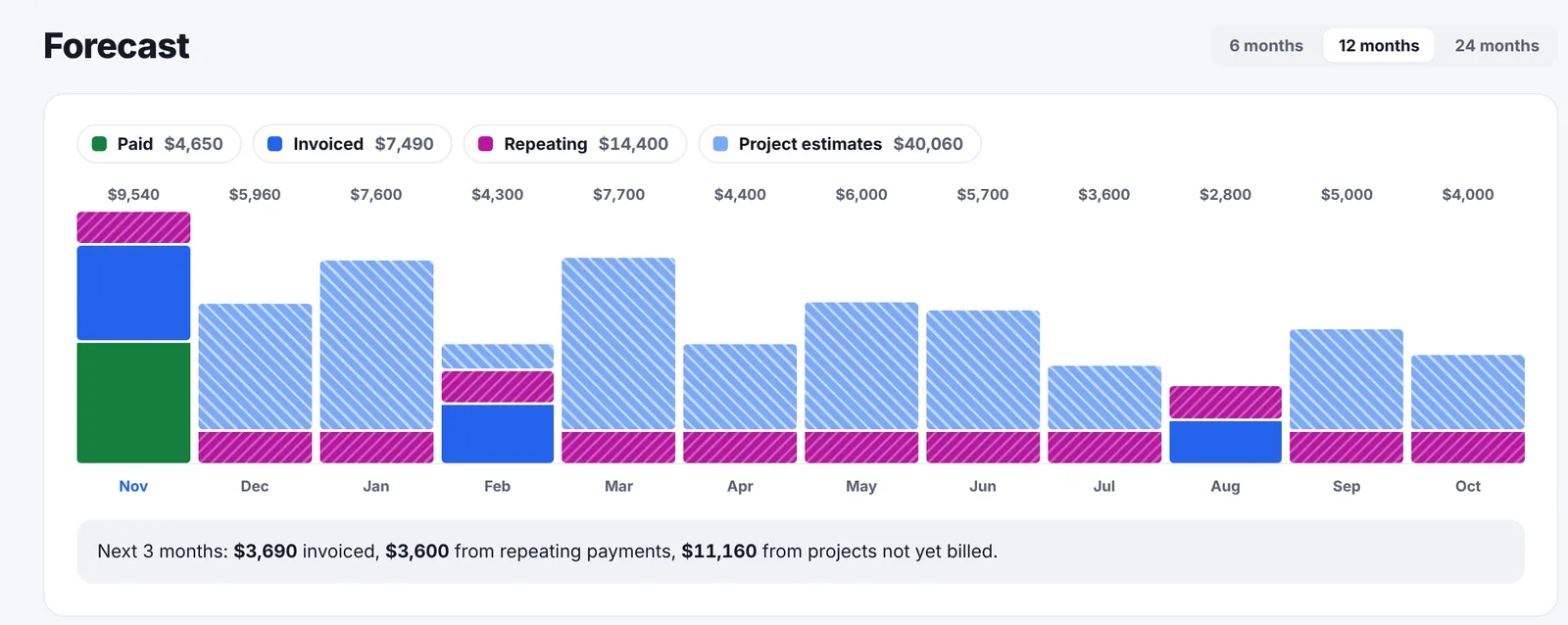
- An income forecast. What the next 6, 12 or 24 months look like, from unpaid invoices, repeating payments and open projects. Clockify's forecasting is about project progress, on Pro.
- Tasks you can see. List, board, calendar and Gantt views, with subtasks and priorities. Clockify's project page describes tasks under projects for tracking time on.
- One price, everything in it. Rates, invoicing, recurring invoices and 43 currencies are in the $14.99 plan. In Clockify they arrive on Basic, Standard and Pro.
Feature by feature
Time tracking
Clockify's timer starts with one click in the web app, a desktop app, a phone app or a browser extension, and you can add hours by hand, in a weekly timesheet or on a calendar. Entries are sorted by project, task and tag and marked billable or not. It can start with your computer, detect idle time, run Pomodoro intervals and track offline. The auto tracker records the apps and websites you use and keeps that on your computer.
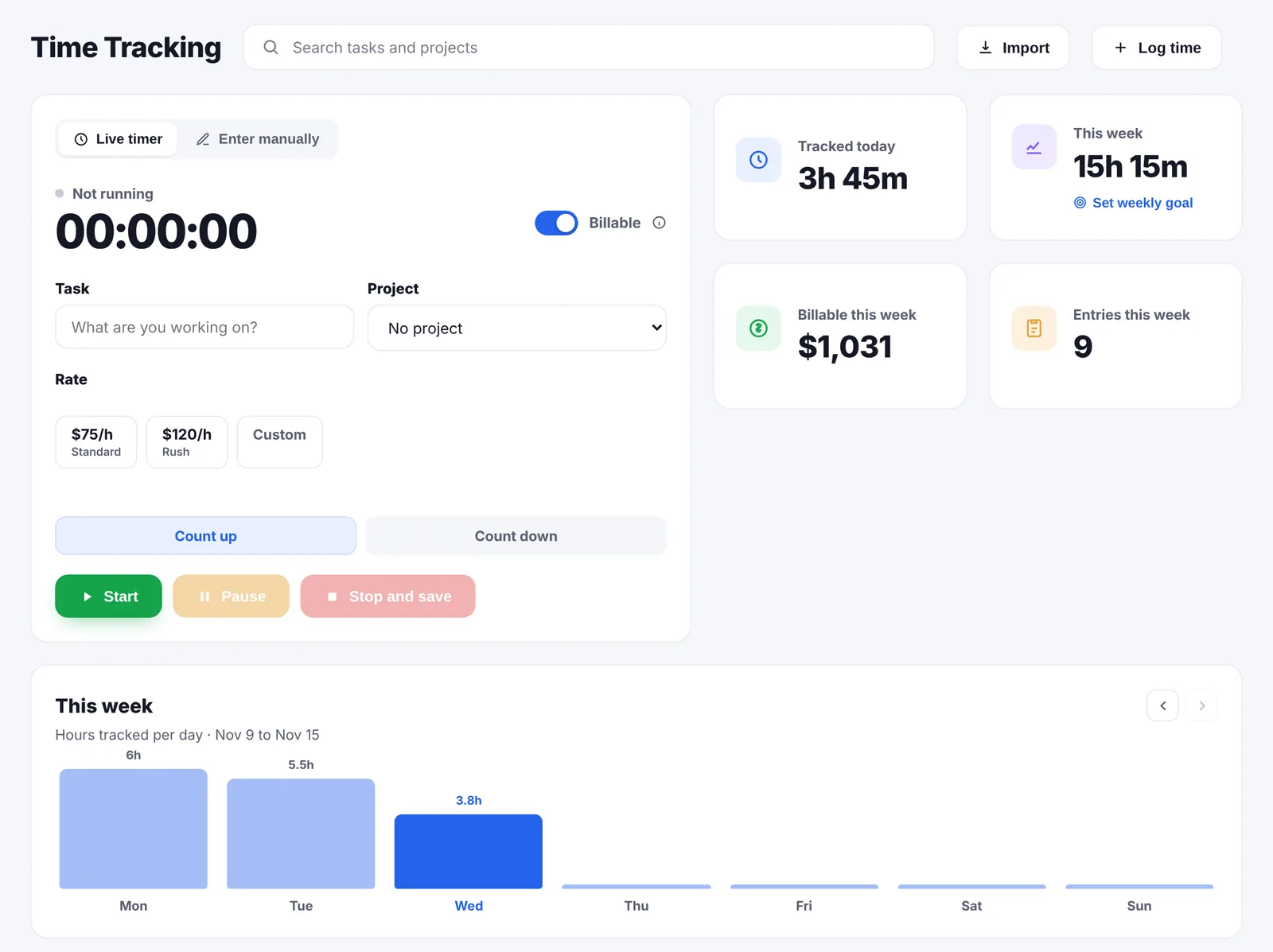
In One Lancer you start the timer from the task, counting up or down, or log time afterwards. Each entry gets one of your saved rates, such as Standard and Rush, and a switch for billable or not. There is no desktop app or auto tracker. Billable hours land on the draft invoice without a separate step, and a time summary for the client exports with your own title and note.
Invoices and getting paid
Clockify makes invoices on Standard and up: you import billable hours and expenses, add items, discounts and taxes, set the currency, put your logo and details on it, attach a time report and download the PDF. Recurring invoices go out at a set interval. You mark invoices sent, paid or void, record payments, and see which are overdue. A QuickBooks integration sends time to QuickBooks.
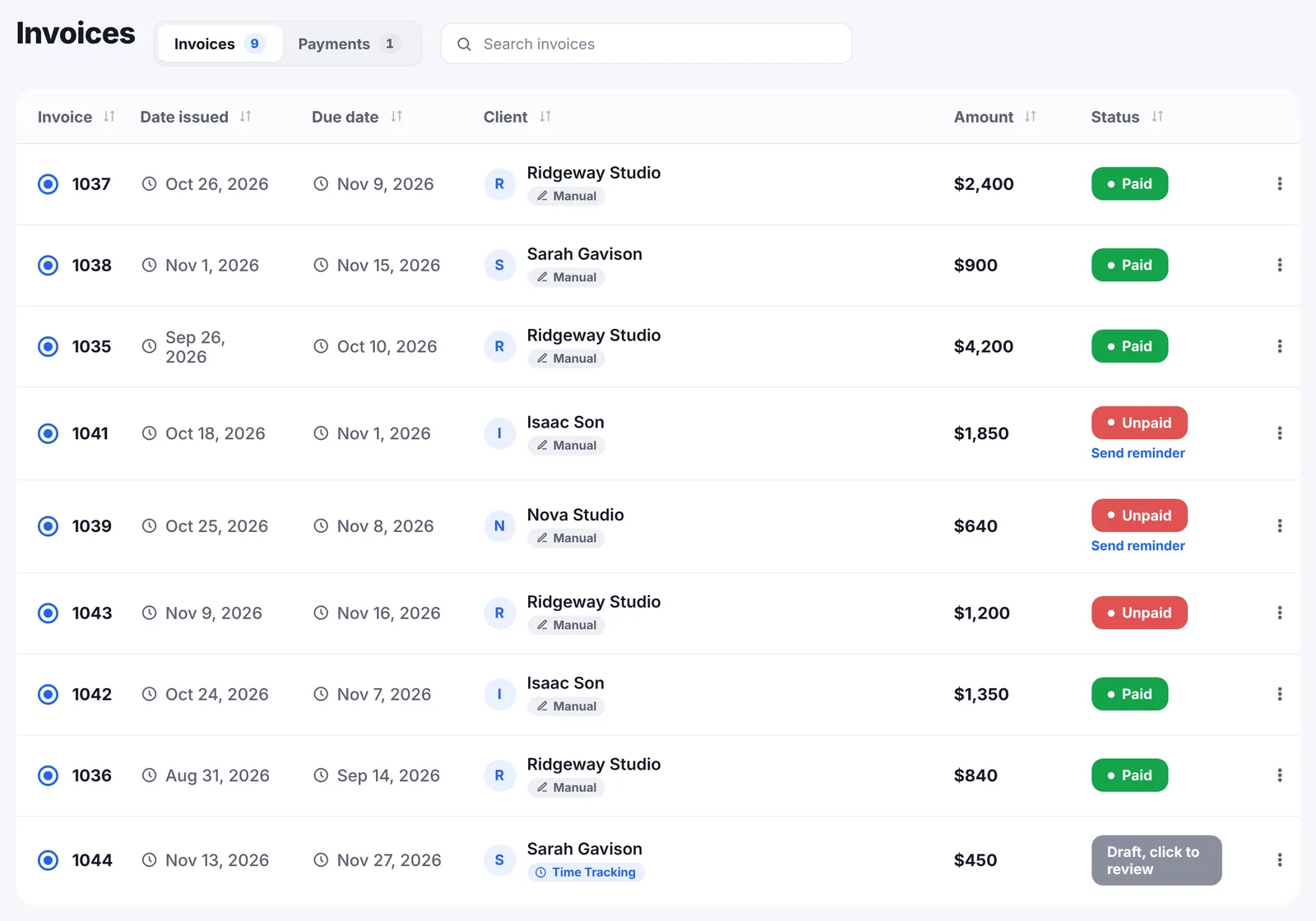
One Lancer sends the invoice as a PDF from your name, or from your own Gmail, with your payment details and an optional card link through your own Stripe account. It has five designs, recurring invoices from weekly to yearly, 43 currencies and its own numbering. Reminders go to the client a day before the due date, on it, then every 7 days up to 3 times, with the invoice attached, and stop the moment it is paid.
Projects and tasks
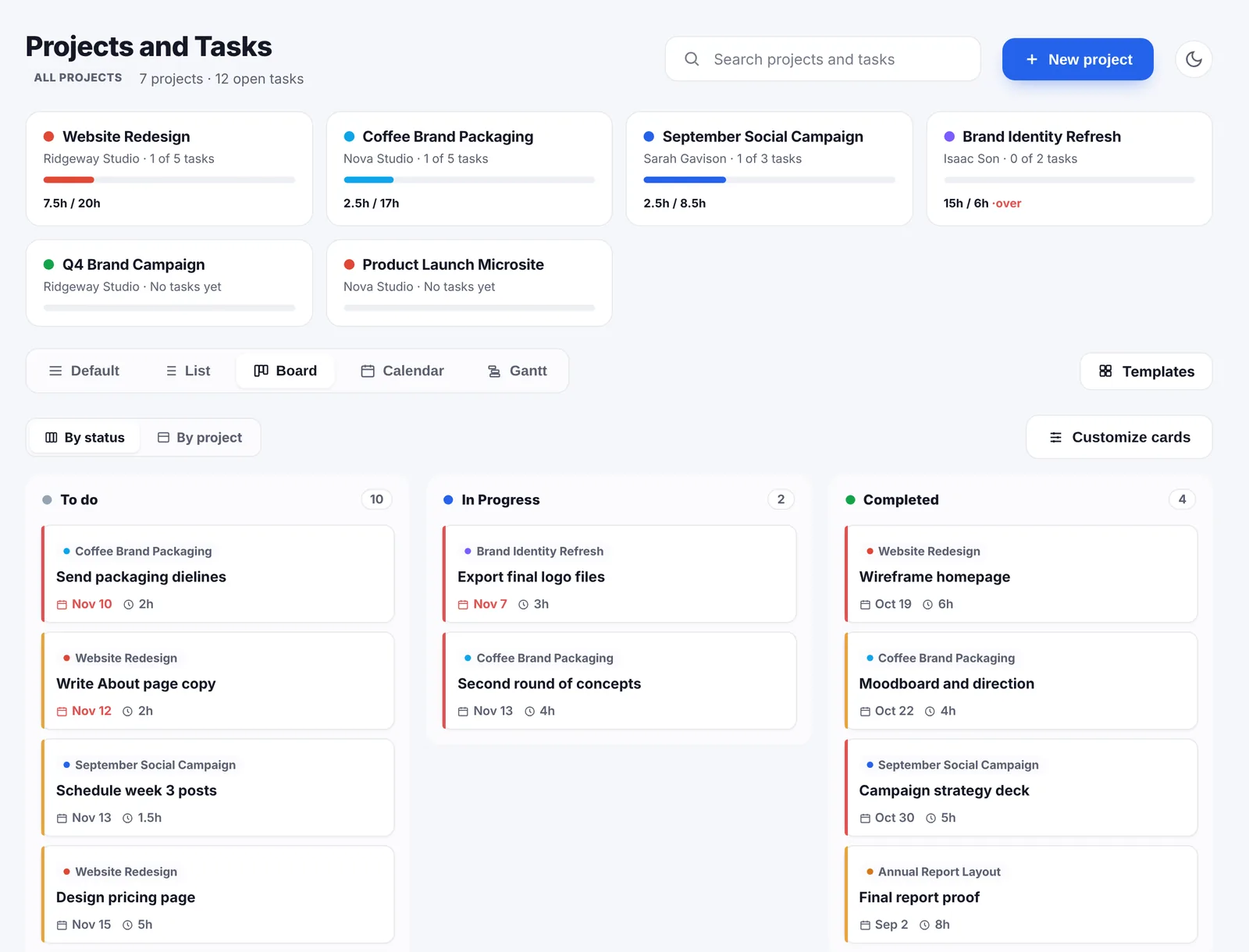
In Clockify a project belongs to a client and holds tasks, estimates and, on Pro, a budget with alerts and a forecast of when it will finish. Tasks exist to track time against and can be marked done. One Lancer treats the project as the work itself: tasks with subtasks, priorities and estimated hours on a list, board, calendar or Gantt, and templates that bring their tasks, rate and invoice setup with them.
Reports and forecast
Clockify reports on time: summary, detailed and weekly reports, billable against non-billable, and cost and profit on Pro, exported or shared by link. One Lancer reports on money: earned, outstanding, overdue and unbilled hours per currency on the dashboard, and a forecast of the next 6, 12 or 24 months.
A month with both
Say you are a freelance developer with four clients, billed by the hour, one of them in euros. You send six invoices a month.
In Clockify, the desktop timer runs all day and the reports are exact. To invoice in two currencies you are on Pro, $9.99 a month. At the end of the month you import each project's hours into an invoice, download the PDFs and email them yourself. When one is late, Clockify shows it as overdue and you write to the client.
In One Lancer, it is $14.99 a month. You track from the task in the browser. The hours are already on each project's draft when the month ends, the invoices go out from your own Gmail, and the late one is reminded without you.
If your hours are tracked well and never late to invoice, Clockify is enough and cheaper. If the gap is between tracked and paid, One Lancer is the better fit.
The two side by side
| One Lancer | Clockify | |
|---|---|---|
| Price and plans | ||
| Built for | One freelancer, from hours to paid | Teams tracking time |
| Price | $14.99 a month, $149 a year | Free; $3.99 to $11.99 a seat billed yearly |
| Time and the work | ||
| Timer and manual time | ✓ on the task, saved rates | ✓ web, desktop, phone, extension |
| Desktop app, offline tracking | ✕ | ✓ |
| Auto tracker, Pomodoro, idle detection | ✕ | ✓ free plan |
| Hours onto the invoice | ✓ automatically | Imported by you, Standard |
| Invoice sent by email | ✓ from your name or Gmail | PDF to download; recurring invoices send themselves |
| Reminders to the client | ✓ quiet hours, away mode | Not described |
| Card payment on the invoice | ✓ via your Stripe | Not described |
| Recurring invoices | ✓ | Standard |
| Currencies | ✓ 43 | Multiple on Pro |
| Task views | ✓ list, board, calendar, Gantt | Tasks under projects |
| Clients and documents | ||
| Client follow-up rhythm | ✓ | Not advertised |
| Planning, wellbeing and limits | ||
| Income forecast | ✓ 6, 12 or 24 months | Project forecasting, Pro |
| Expenses | ✕ | Pro |
| Timesheet approval, time off, scheduling | ✕ | Standard and Pro |
| Integrations | Gmail, Google Calendar, Stripe | 100+, QuickBooks |
| Lifetime plan | $299 once | Not offered |
So which one
If all you need is a record of your hours, use Clockify's free plan. Paying for One Lancer to do only that would be a waste.
If you bill those hours yourself, look at what happens after the timer. In Clockify the invoice is a PDF you send and a client you chase. In One Lancer the invoice goes out, the reminders follow, and the client's follow-up date is waiting for you.
Before you decide, look at last month's tracked hours and check how many were invoiced within a week, and how many of those invoices were paid on time.
Switching from Clockify
- Bring your hours. Paste a Clockify API token and One Lancer imports your time entries; the token is not stored. A CSV or Excel export works too.
- Bring your clients. Import them from a CSV or Excel file or a Google Sheet. Columns One Lancer does not know become custom fields.
- Bring your invoices. Upload the invoices you still need as PDFs, so they sit in the same list.
- Connect Gmail and turn reminders on. Both are on the one plan.
You can also keep tracking in Clockify and bring the hours over each month.
Other Clockify alternatives
One Lancer is one Clockify alternative; it fits a freelancer who wants the hours, invoices and reminders in one place. These are the other tools we have compared side by side, each from the vendor's own pages:
- Harvest. Harvest is time tracking first, with invoicing: free for 1 seat and 2 projects, then $11 a seat a month.
- FreshBooks. FreshBooks is accounting software that also invoices, with expenses, bank reconciliation and proposals.
- Bonsai. Bonsai grows into an agency suite with proposals, contracts, bookkeeping and team seats; invoices start on its $25 plan.
- Plutio. Plutio is the wider product: proposals, scheduling, forms, a client portal and a team, with a 9-client limit on its cheapest plan.
- Indy. Indy is free for 3 invoices a month and keeps Gmail, white labelling and payment reminders for its Pro plan.
- Zoho. Zoho is a suite: Zoho Invoice is free for 3 projects and 500 invoices a year, next to Zoho CRM, Bookings and Solo.
- Toggl Track. The best-known time tracker: free for up to 5 users, with billable rates on its $10 Starter plan and no invoicing of its own.
- Moxie. All-in-one for freelancers from $12 a month, with proposals and contracts on the cheapest plan and the client portal on Pro.
All of them are on the comparisons page.
Questions people ask
Is Clockify free?
Yes. Clockify's free plan covers up to 5 users with unlimited time tracking, the timer, timesheet, calendar, auto tracker, mobile and desktop apps and reports, with reports limited to one month of data and PDF export only. Billable rates start on Basic and invoicing on Standard. One Lancer has no free plan: 7 days free, then $14.99 a month.
How much does Clockify cost?
Per seat, billed yearly or monthly: Basic $3.99 or $4.99, Standard $5.49 or $6.99, Pro $7.99 or $9.99, Enterprise $11.99 or $14.99. Every active or invited user needs a seat. One Lancer is $14.99 a month, $149 a year, or $299 once, for one freelancer with everything included.
Can Clockify send invoices?
Clockify creates invoices from billable time and expenses on its Standard plan and up. You download the invoice as a PDF and send it to the client, or set a recurring invoice to go out at an interval. Its invoicing page does not describe clients paying online. One Lancer emails the invoice as a PDF from your name or your own Gmail, with an optional card link through your own Stripe account.
Does Clockify remind clients about unpaid invoices?
Clockify's invoicing page says you can see unpaid invoices past their due date and get reminders about them, which are reminders for you. One Lancer emails the client for you: a day before the due date, on it, then every 7 days up to 3 times, in your own words, and stops the moment the invoice is paid.
Which Clockify plan do I need as a freelancer?
To bill hours you need Basic for billable rates, Standard for invoicing, recurring invoices and rounding, and Pro for expenses and multiple currencies. One seat on Standard is $6.99 a month, or $5.49 billed yearly.
Is Clockify cheaper than One Lancer?
Yes, for one person. One Clockify seat with invoicing is $5.49 to $6.99 a month, and $7.99 to $9.99 with multiple currencies, against $14.99 for One Lancer. The difference is what happens after the hours are tracked: One Lancer sends the invoice, reminds the client, keeps your follow-ups and forecasts your income.
What does Clockify do that One Lancer does not?
A free plan, desktop apps for Mac, Windows and Linux, native iOS and Android apps that work offline, a browser extension, 100+ integrations, an auto tracker, Pomodoro and idle detection, timesheets with approval, time off, scheduling, expenses, a kiosk, GPS tracking and team roles.
What does One Lancer do that Clockify does not?
Invoices sent by email from your own Gmail, payment reminders written to the client, a card link through your own Stripe account, a follow-up rhythm and payment label per client, an income forecast up to 24 months ahead, tasks on a board, calendar and Gantt, 43 currencies on the one plan, and a lifetime plan.
Can I import my Clockify hours into One Lancer?
Yes. One Lancer imports time entries from Clockify with an API token you paste in, which is not stored, or from a CSV or Excel export. Clients come in from a CSV or Excel file or a Google Sheet.
Can I use Clockify and One Lancer together?
You can. Keep tracking in Clockify's desktop app and bring the hours into One Lancer to invoice and chase them. If you track in One Lancer, billable hours land on a draft invoice by themselves.
Sources
Everything about Clockify on this page was read from Clockify's own pages on 15 November 2026:
- Clockify pricing: plans, seat prices, what each plan adds, free plan limits and the trial
- Invoicing: what an invoice holds, recurring invoices, statuses, payments and overdue invoices
- Timer, timesheet, calendar and auto tracker: ways to track and where the apps run
- Rates, projects and reports: rate levels, budgets, forecasting and exports
- Expenses, time off, approval, kiosk and location: the team features
Prices move, and the figures above are what Clockify’s own pages said on the date given, so check theirs before you pay for anything. We wrote this page, Clockify did not: there is no partnership between us, nobody asked us to write it, and the name Clockify belongs to them.
Keep going
One Lancer vs Harvest One Lancer vs FreshBooks One Lancer vs Bonsai One Lancer vs Plutio What One Lancer does Pricing Billable hours calculator Payment reminder emails Free invoice generatorSee it before you decide
Seven days, your own clients and invoices in it, and a founder who answers email. Then $14.99 a month, cancel any time.